Receivable Aging (Inquiry)
Additional Information
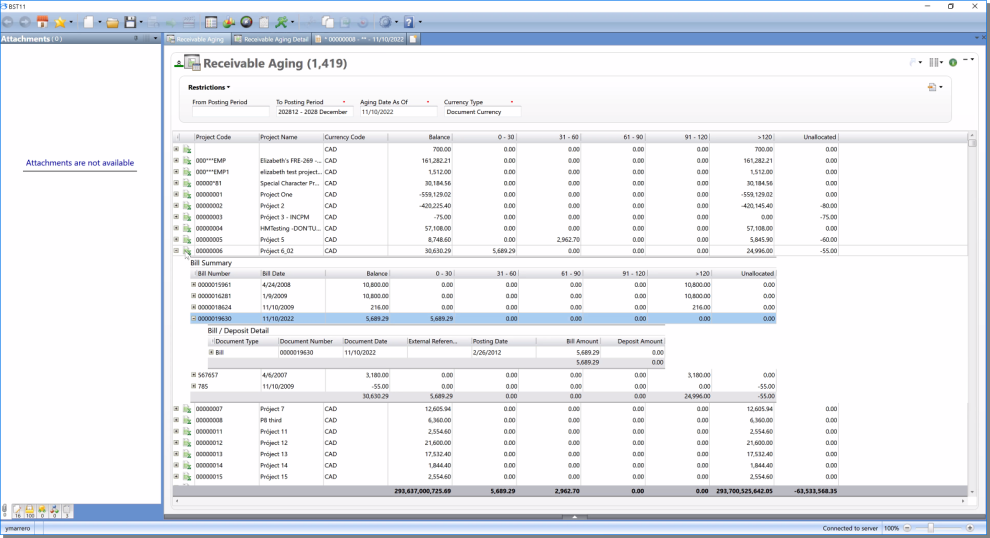
The Receivable Aging Inquiry allows you to query for and view project receivable information, which includes all project bill, deposit activity, and outstanding balances by time period (aging). The inquiry provides four levels of information, which include a summary of receivable balance and aging by project, a bill summary, a bill / deposit detail information, and associated general ledger transactions.
Note: If you do not enter a date in the From Posting Period field, only open items are returned. Open includes items posted after the To Posting Period or where the Zero Balance is empty. In addition, you can use the optional Include Payee Balance of Zero restriction to include employee / vendor / clients with a balance amount of zero.
The View Final Bill Transactions Inquiry option is a related item that allows you to send Final Bills associated with a selected row. You can use the email service by highlightinga Bill Deposit Detail line and right clicking to display the Related Items. If multiple rows are selected, each document opens in a separate tab. See Email Configuration for more information about the email service.
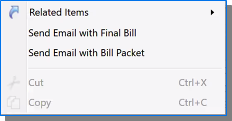
The Receivable Aging Inquiry also has a right click context menu that allows you to send the Final Bill or Bill Packet associated with the selected row.
Restrictions
The inquiry includes the following default restrictions:
| Req'd | Restriction | Description |
|---|---|---|
| From Posting Period |
Enter or select a posting period. This is the first date in the date range to include all items. If you do not enter a date, only open items are returned. Open includes items posted after the To Posting Period or where the Zero Balance is empty. In addition, you can use the optional Include Payee Balance of Zero restriction to include employee / vendor / clients with a balance amount of zero. |
|

|
To Posting Period | Enter or select a posting period. This is the last date in the date range to include open items. This field defaults to the current posting period. |
|
|
Aging Date As Of | Enter or select the reference aging date to use on the inquiry. This field defaults to the current date. |
|
|
Currency Type | Enter or select the type of currency to display on the inquiry. This field defaults to Document Currency, but available options include Base Currency, Company Currency, and Document Currency. |
For a list of the optional restrictions, see  Receivable Aging Inquiry Optional Restrictions.
Results
The inquiry results include the following four levels of information:
-
Receivable Aging Summary: The first level of the inquiry provides receivable aging information, which includes Project Code, Project Name, Currency Code, Balance, data by aging categories, and Unallocated.
Receivable Aging Information Optional Columns. -
Bill Summary: The second level of the inquiry provides bill summary information, which includes Bill Number, Bill Date, Balance, data by aging categories, and Unallocated.
Bill Summary Information Optional Columns. -
Bill / Deposit Detail: The third level of the inquiry provides bill and deposit detail information, which includes Document Type, Document Number, Document Date, Bill Amount, and Deposit Amount.
Bill and Deposit Information Optional Columns. -
General Ledger Transactions: The fourth level of the inquiry provides general ledger transaction detail information, which includes Account Code, Account Name, Organization Name, Organization Code, Internal Reference Number, Debit, and Credit.
General Ledger Transactions Optional Columns.